Workspace logs
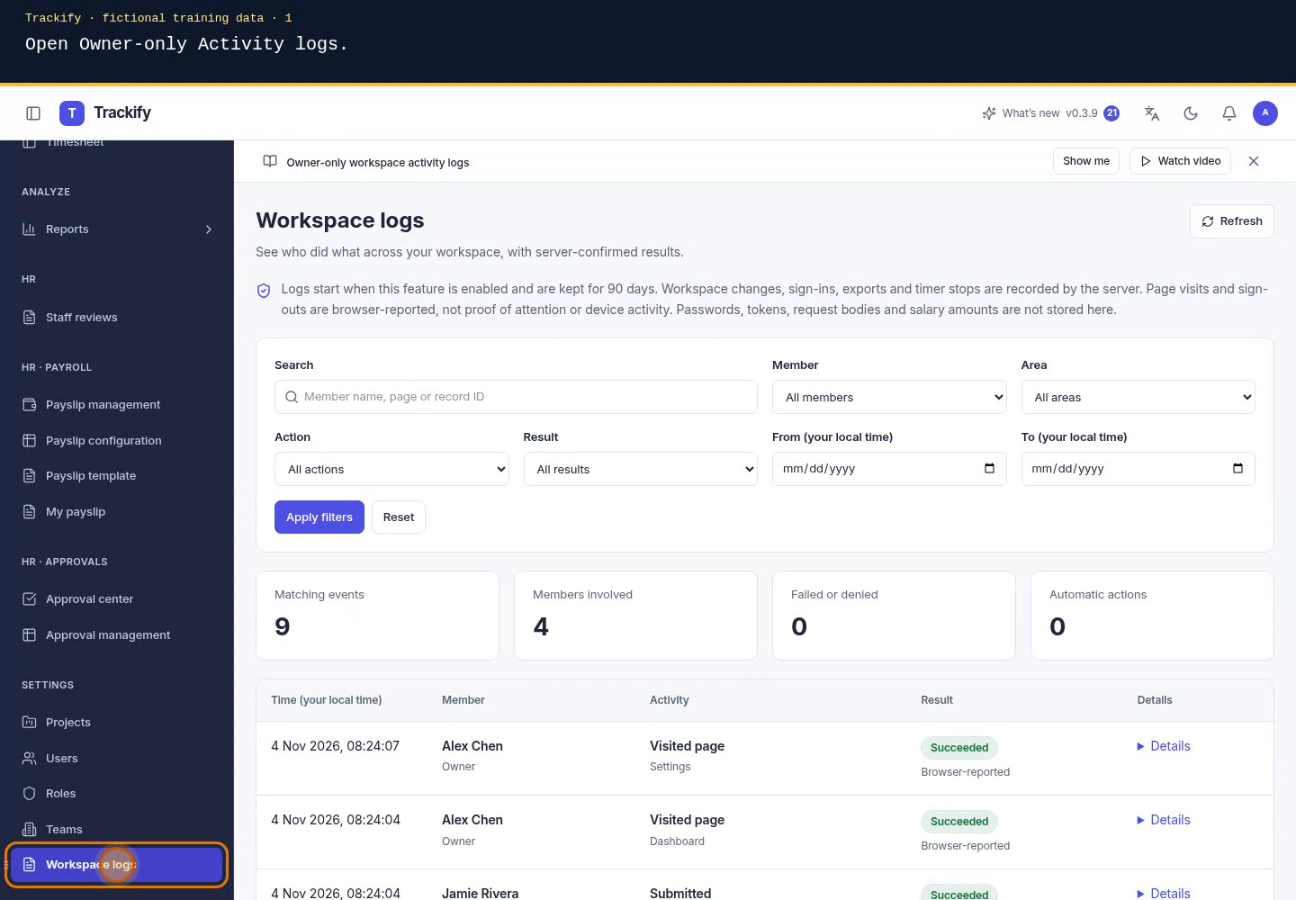
Workspace logs answer “who changed this, and when?”. They are visible only to the workspace Owner and kept for 90 days.
For: Owner
Open and filter the logs
- As the Owner, open Settings → Workspace logs.
- Filter by Search (member name, page or record ID), Member, Area, Action, Result and a From / To range in your local time, then click Apply filters.
- The tiles count Matching events, Members involved, Failed or denied and Automatic actions. Click Details on a row for more.
What is recorded — and what is not
- Recorded by the server: every create, edit and delete (area, action, result, record ID), exports, views of individual payslips and compensation, sign-ins to the workspace and automatic timer stops with their reason.
- Reported by the browser: page visits inside the app and sign-outs. These show that a page was opened — not that anyone was looking at it, or what the device was doing.
- Never stored here: IP addresses, browsers, request bodies, passwords, tokens or salary amounts.
Try it with your team
Trackify is free for up to 5 users, with no time limit and no card required.